
Your Card · Vital Info
Medical Devices
Some medical devices cannot be seen, and treating you without knowing they are there can be dangerous, not just unhelpful. This section is about implanted or worn devices, not the medications or conditions covered elsewhere.
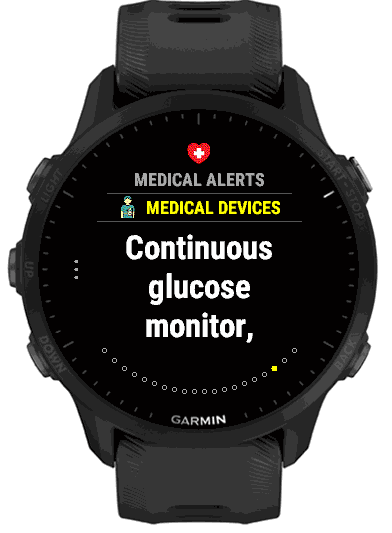
Why this cannot wait until later
The clearest example is a defibrillator (AED). It delivers a shock to restart a normal heart rhythm, but pads placed directly over an implanted pacemaker or ICD can damage the device or weaken the shock, so responders are trained to place them differently when they know one is there. Someone with an insulin pump who is found unconscious may be having a pump problem rather than an unrelated medical event. Cochlear implants and some other devices can also be affected by MRI and other imaging, which hospital staff want to know before, not after.
The list: 15 devices
- Pacemaker
- Implantable defibrillator (ICD)
- Insulin pump
- Continuous glucose monitor
- Hearing aid
- Cochlear implant
- Dialysis catheter / port
- Feeding tube
- Home oxygen therapy
- Ventilator
- Prosthetic limb
- Joint replacement (hip/knee)
- Spinal implant / rod
- Cerebral (VP) shunt
- Cardiac stent
Picking from the list, or typing your own
It works the same way as the other lists. On the phone, turn on the switch beside each device, and use Other devices for the rest. On the watch, open Medical Devices in Settings: Show first, then every device with a tick box (ticked ones first), and last a box for anything else, such as a medical alert bracelet. Separate several typed devices with commas.
On the card, devices are the last pages of Medical Alerts, after the medications, under the heading Medical Devices. They are not counted on the Vital Info summary, but a card that holds only a device, for example a pacemaker, still shows its Medical Devices page.