
Your Card
Local Help
The person who needs to call is often not the person wearing the watch, and is often a visitor who knows neither the local emergency number nor where they are. Local Help shows the right numbers for the place you are in.
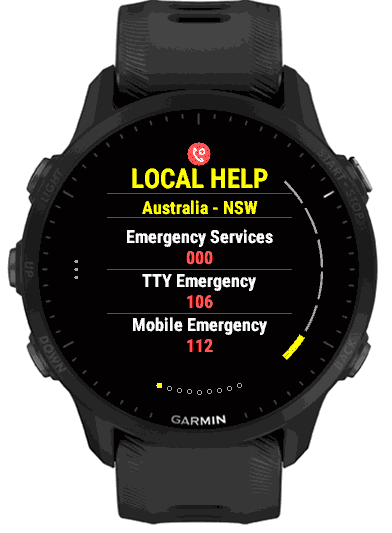
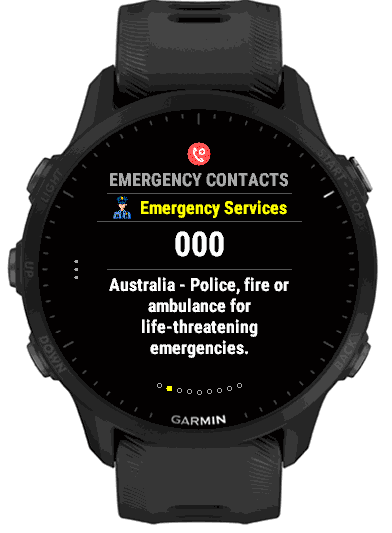
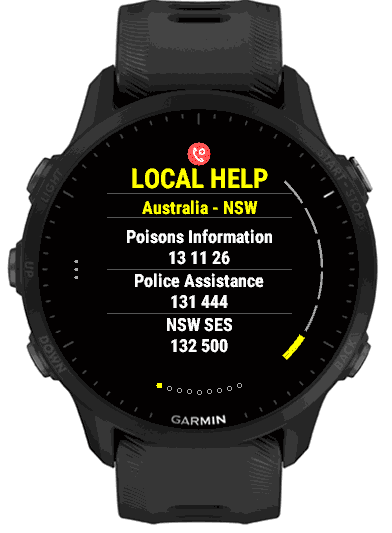
What it shows
The Local Help page names the place at the top, for example Australia – NSW, and lists its emergency numbers in large text, with the emergency numbers in red. A place with more numbers continues over further pages: poison information, non-urgent police, disaster response, crisis lines and similar services. Swipe or press DOWN to move on.
Press START (or tap) to step through the numbers one at a time. Each shows the number and a short plain description of what it is for, for example “First-aid advice for suspected poisoning; call 000 for a life-threatening emergency”. A text-only TTY line is marked as such. Press BACK to return to the card.
It follows where you are
You do not have to do anything when you travel. When EmergencyAid opens, it uses the watch’s last known position and a short GPS check to work out the country, and switches Local Help to that country’s numbers. Opening the Location page updates it again. Inside Australia it goes one step further and picks the state or territory, so you see its own police-assistance and disaster-response numbers.
Your position always takes priority. If you pick a country by hand and the GPS then places you in a different one, Local Help switches to where you are. Until the watch has a position at all, Local Help shows Australia – NSW.
Choosing a country by hand
Hold UP (or the bottom button) and open Local Help in Settings, or hold on a Local Help page and the Settings list opens with the cursor on Local Help. The Country / region row shows the current place. Select it to see a list of countries with the current one first, then the rest alphabetically. For most countries that is all: the national numbers are shown. Australia has a second step, Region, where you choose National or a state or territory: ACT, NSW, NT, QLD, SA, TAS, VIC or WA.
The same screen has a Show switch, which leaves Local Help out of the card.
Where the numbers come from
The numbers are built into the app, so nothing is downloaded and nothing needs a connection. They cover 227 countries and territories with 1,281 entries stored in the app (each a service and its number, and a few list two numbers), and go beyond police, fire and ambulance. They are drawn from the ITU’s E.129 list of emergency and social-value services, cross-checked against the emergency-call data in Android and Google’s libphonenumber.
State and province numbers for countries are not included in this version (except Australia): for them Local Help shows the national numbers.